Log in with your username to reliably save your game progress and achievements
About game
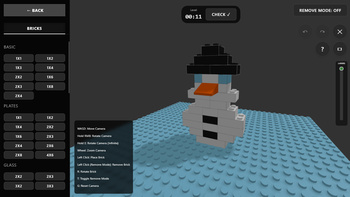
Dive into a realm of boundless imagination with «Lego Constructor 3D»! This vibrant building simulator allows you to turn any vision into reality.
What you can expect:
* **Unlimited creativity**: Design houses, vehicles, fortresses, or avant-garde forms — the choice is yours. An extensive range of pieces and hues is at your fingertips.
* **Speedbuild trials**: Hone your skills by quickly constructing models based on ghostly outlines, all while racing against the clock to collect coins.
* **Gallery**: Showcase your masterpieces, share them with fellow players, and appreciate their creations.
* **Versatility**: Enjoy seamless gameplay on both computers and mobile devices.
Craft extraordinary worlds, enhance your spatial reasoning, and unwind as you piece together your beloved constructor in 3D!
How to play
On PC:
• WASD — move the camera.
• Hold the mouse wheel (or press E) — rotate the camera around a point.
• Mouse wheel scrolling — zoom in or out.
• LMB (left mouse button) — place a brick.
• R — turn the brick 90 degrees.
• T — switch to removal mode.
• G — return the camera to its default position.
On mobile:
• One finger — rotate the camera.
• Two fingers spread apart or together — zoom in and out.
• Virtual joystick — move the camera.
• On-screen buttons — place, remove, and rotate bricks.
Tips:
• In Speedbuild mode, use the Layers slider on the right to hide upper rows and reveal what needs to be built inside.
• If your laptop has a touchscreen, you can activate the mobile interface via the special button (rectangle icon) in the tutorial menu.